How to use DAF Pro
Put on headphones, press Start and begin talking, then move the delay slider until hearing your voice back slows you down. Lower delays usually work best, and no one setting suits everyone.
New to it? What DAF Pro is, and who it is for.
How do I set it up?
- Plug in wired headphones, or connect Bluetooth ones, before you press Start. DAF Pro needs a headset, so the delayed sound reaches your ears without the microphone picking it up again.
- Press Start and begin talking, and listen to how your voice sounds.
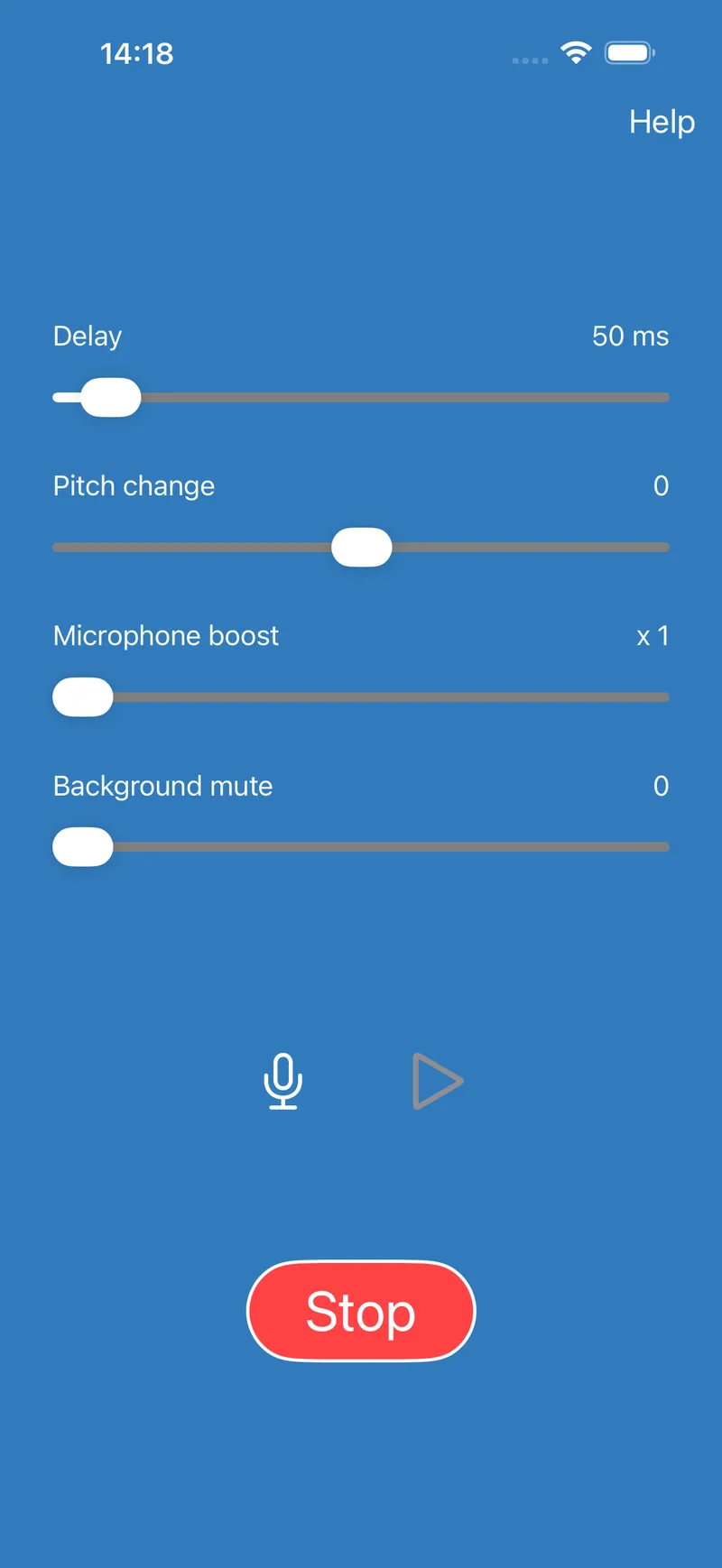
- Move the delay slider to the right to lengthen the delay, which is shown in milliseconds.
- Move the pitch change slider left to lower your voice or right to raise it. In the centre it is left unchanged.
- If your voice sounds too quiet, raise the microphone boost. Background mute silences sounds below a set volume, which cuts the noise around you when you are not speaking.
- Press Stop when you are done. Until then it keeps running with the screen locked.
Common questions
What delay should I start with?
Lower delays usually work best. Change one control at a time, the delay first and then the pitch change and microphone boost, and then try them in combination. No setting is best for everyone, and if the effect fades as you get used to one delay, try a different one.
Practise in different situations, one to one, in a group, somewhere quiet and somewhere noisy, because you may need different settings for each.
Why is the shortest delay longer with Bluetooth?
Bluetooth headphones add a delay of their own, which varies from headset to headset, on top of the one you set. Wired headphones work best if you want a short delay. Bluetooth works well for the longer settings.
Why does it not use my Bluetooth headset’s microphone?
On Android, the headset may be connected for music only. Open your phone’s Bluetooth settings and make sure Phone calls is turned on for the headset. If it is also connected to another device, such as a laptop, disconnect it there and try again.
Why does it stop when I lock my phone?
On Android, DAF Pro needs permission to show notifications to keep running with the screen off. Allow notifications when it asks, or turn them on for DAF Pro in your phone’s settings, and it will carry on in your pocket.
Can I hear how I sound?
Yes. Press the microphone button to record up to 60 seconds with your current settings, then the play button to hear it back. Listening back is how most people work out which delay suits them. On Android, the reading passage gives you something to read aloud while you do.
Does it work during phone calls?
No. iPhone and iPad do not allow any app to record audio during a call, and Android has blocked it since Android 10. Earlier versions of Android may allow it, but with so many different devices we cannot say which will.
What if my question is not answered here?
Email support@speechtools.co and one of the two people who build these apps will answer.